• Responding to email notices you receive.
    **************************************************
    In short, DON'T! Email notices are to ONLY alert you of a reply to your private message or your ad on this site. Replying to the email just wastes your time as it goes NOWHERE, and probably pisses off the person you thought you replied to when they think you just ignored them. So instead of complaining to me about your messages not being replied to from this site via email, please READ that email notice that plainly states what you need to do in order to reply to who you are trying to converse with.

  • IMPORTANT! PLEASE READ!! About the Google Adsense ads being displayed

    =====================
    Posted 08/15/2025
    =====================


    Yeah, I know. They are a pain in the butt. But they pay the bills to keep my server running. Just a fact of life, I am afraid.

    Want to get rid of them? Simple. Just become a Contributor level member or above and they will be gone. -> Please click HERE."

    Is that too much for me to ask of you to keep this site running? Well, sorry about that. I too wish I could get everything for free. But alas.....

    =====================
    Addendum: 01/10/2026
    =====================


    Google Adsense ad revenue for December, 2025 was just $30 over the cost of the lease for the server running this site. So, in effect, the money providing the incentive for me to continue running this site is coming SOLELY from the paid memberships and sponsorships here. Which honestly ain't much....

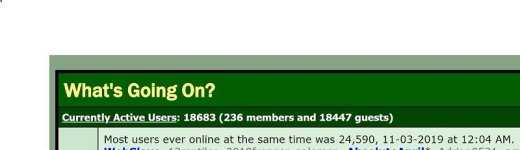
Lots of guests today...

WebSlave

It is what it is, but certainly not what it was.
Staff member
Staff
Joined
Feb 3, 2002
Messages
20,505
Reaction score
864
Points
113
Location
Crawfordville, FL
Currently Active Users: 15406 (256 members and 15150 guests)

Most users ever online at the same time was 16,625, 11-01-2019 at 12:03 PM.


:shrug01:
 
Any indication that this is an attack of some sort, e.g. DNS?
 
I'm not really sure. Hasn't impacted the server stats much at all. The guys taking care of my server are top notch at hardening servers against intrusions, so I don't worry much about that any more.

Looks like most of the guests were trying to view the profiles of all the members. But of course, they are blocked from doing that by the way I have the permissions set up.

So likely maybe some "google wannabe" new site hasn't fine tuned their spider searching algorithm yet.

But it sure does screw up the statistics trying to figure out what the TRUE number of visiting guests is to this site on any given day.
 
But wait! There's more!

Currently Active Users: 20783 (247 members and 20536 guests)
View Who's Online
Most users ever online at the same time was 22,344, 11-02-2019 at 12:30 AM.
 
Just did a spot check of the IP addresses of some "guests" and nearly all of them are originating out of China.

Nice that the folks in China have taken such an interest in the membership here. :hehe:

Several loading stats are rather modest, so this doesn't seem to be having any notable effect on the server's functioning. But if it does get to that, I found a site a while back (hopefully I can find it again if need be) that gave a list of ALL IP addresses in China in a format to plug into the server's WHM panel to ban them all at the door.
 
Just did a spot check of the IP addresses of some "guests" and nearly all of them are originating out of China.

Nice that the folks in China have taken such an interest in the membership here. :hehe:

Several loading stats are rather modest, so this doesn't seem to be having any notable effect on the server's functioning. But if it does get to that, I found a site a while back (hopefully I can find it again if need be) that gave a list of ALL IP addresses in China in a format to plug into the server's WHM panel to ban them all at the door.

I have/manage multiple dedicated servers in different data centers around the US. Some of them are running WHM.

In WHM:
1. On left under Plugins > ConfigServer Security & Firewall
2. Under the "csf - ConfigServer Firewall" section > Firewall Configuration
Look for the section called "Country Code Lists and Settings"
In teh "CC_DENY =" field place the country code. Multiple can be separated by comma. China is CN. Here is a list of all codes for reference: https://en.wikipedia.org/wiki/ISO_3166-1_alpha-2

3. Scroll to the bottom of the Firewall Configuration page and click on the Change
4. When the page refreshes, click Restart csf+lfd button to restart CSF with new settings.

Let me know if you have any questions.
 
I have/manage multiple dedicated servers in different data centers around the US. Some of them are running WHM.

In WHM:
1. On left under Plugins > ConfigServer Security & Firewall
2. Under the "csf - ConfigServer Firewall" section > Firewall Configuration
Look for the section called "Country Code Lists and Settings"
In teh "CC_DENY =" field place the country code. Multiple can be separated by comma. China is CN. Here is a list of all codes for reference: https://en.wikipedia.org/wiki/ISO_3166-1_alpha-2

3. Scroll to the bottom of the Firewall Configuration page and click on the Change
4. When the page refreshes, click Restart csf+lfd button to restart CSF with new settings.

Let me know if you have any questions.

Thank you! That tip is pretty handy to have available. Never noticed it in WHM before, as the last time I looked into something like that I had to key in every IP address related to the country to be blocked.
 
Looks like we are getting a flood again...
 

Attachments

  • guests_01202020.JPG
    guests_01202020.JPG
    31.7 KB · Views: 205
BTW, I did look into the WHM option to deny IP addresses based on country codes, and I noticed this warning:
WARNING: Some of the CIDR lists are huge and each one requires a rule within
the incoming iptables chain. This can result in significant performance
overheads and could render the server inaccessible in some circumstances. For
this reason (amongst others) we do not recommend using these options.

Based on the huge number of IP addresses likely involved, this does not appear to be a feasible plan to implement, unfortunately. Unless I am being overly cautious, of course.
 
BTW, I did look into the WHM option to deny IP addresses based on country codes, and I noticed this warning:


Based on the huge number of IP addresses likely involved, this does not appear to be a feasible plan to implement, unfortunately. Unless I am being overly cautious, of course.

As long as you have the dedicated resources available (Non VPS) it shouldn't be an issue. One of my sites where there is on average 500 active users at any one time did not have any resource utilization change when blocking just CN (approx 6000 CIDRs).

I think the specs of that guy is running a single Xenon E3-1220 and 8GB RAM with WHM/Cpanel hosting VBulletin 4.0.
 
Hmm, well perhaps I can give it a whirl, but start with a smaller target, like Ukraine, of Pakistan and just see how the server stats look afterwards.

Thanks for the advice on this. It is appreciated.
 
As long as you have the dedicated resources available (Non VPS) it shouldn't be an issue. One of my sites where there is on average 500 active users at any one time did not have any resource utilization change when blocking just CN (approx 6000 CIDRs).

I think the specs of that guy is running a single Xenon E3-1220 and 8GB RAM with WHM/Cpanel hosting VBulletin 4.0.

OK, I'm giving this a try right now. Limiting the country block to only Iran at the moment to see what effect, if any, this has on server loading. I did see a jump from 0.10 to 0.42 right after I implemented this, but that is manageable.

If this goes OK, I will add Pakistan and Ukraine to the list. I do have some legitimate users from China, so I am reluctant to block all of China unless I get more provocation to do so.

But I am getting a dozen or two spammers I block manually every day. Haven't been checking the IP addresses, however, as I just delete them as that is the quickest method of dealing with them. I used to ban them, but that proved to be an exercise in futility.

Thanks.
 
Yeah, seems to be the case. I booted a couple more spammers with IPs from Russia, so I added "RU" to the table. I know I have some legitimate users from Russia, but screw it. They can always move or use a VPN if they have a pressing need to access this site.

And what the heck, I just went ahead and plugged in Pakistan (PK) and Ukraine (UA) too while I was in there.

So I'll just monitor the IPs of new spammers and see if that is working or not.

This could be a pretty handy tip you relayed to me if it solves a lot of these spammer problems. :thumbsup:
 
Yeah, seems to be the case. I booted a couple more spammers with IPs from Russia, so I added "RU" to the table. I know I have some legitimate users from Russia, but screw it. They can always move or use a VPN if they have a pressing need to access this site.

And what the heck, I just went ahead and plugged in Pakistan (PK) and Ukraine (UA) too while I was in there.

So I'll just monitor the IPs of new spammers and see if that is working or not.

This could be a pretty handy tip you relayed to me if it solves a lot of these spammer problems. :thumbsup:

Well, this doesn't appear to be working very well. Just got a spammer with a Ukrainian IP address. 159.224.255.154

Maybe I didn't set something up correctly?
 
Last edited:
Back
Top