• Responding to email notices you receive.
    **************************************************
    In short, DON'T! Email notices are to ONLY alert you of a reply to your private message or your ad on this site. Replying to the email just wastes your time as it goes NOWHERE, and probably pisses off the person you thought you replied to when they think you just ignored them. So instead of complaining to me about your messages not being replied to from this site via email, please READ that email notice that plainly states what you need to do in order to reply to who you are trying to converse with.

  • IMPORTANT! PLEASE READ!! About the Google Adsense ads being displayed

    =====================
    Posted 08/15/2025
    =====================


    Yeah, I know. They are a pain in the butt. But they pay the bills to keep my server running. Just a fact of life, I am afraid.

    Want to get rid of them? Simple. Just become a Contributor level member or above and they will be gone. -> Please click HERE."

    Is that too much for me to ask of you to keep this site running? Well, sorry about that. I too wish I could get everything for free. But alas.....

    =====================
    Addendum: 01/10/2026
    =====================


    Google Adsense ad revenue for December, 2025 was just $30 over the cost of the lease for the server running this site. So, in effect, the money providing the incentive for me to continue running this site is coming SOLELY from the paid memberships and sponsorships here. Which honestly ain't much....

Error When Navigating

bcr229

Snakes Are Cool
Staff member
Staff
Endowment
Joined
Mar 29, 2013
Messages
3,566
Reaction score
381
Points
83
Location
Inwood, WV USA
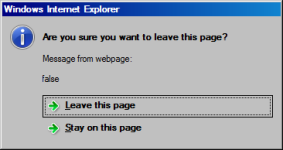
As I navigate through the forums I'm seeing this error constantly, whether or not I've made any changes.

Browser is IE version 11.0.9600.18282

It's not happening with FireFox.
 

Attachments

  • fc.png
    fc.png
    7.8 KB · Views: 143
No changes that I am aware of have been made on this site or on my server. :shrug01:
 
I loaded up Internet Explorer version 9 on my desktop and am getting the same thing when using that browser. I did a quick look in Google for this problem and found this page -> http://answers.microsoft.com/en-us/...e/562053e5-9141-4511-aa78-0747cc382018?auth=1

Might or might not help you. I don't have time to read through it all myself right at the moment. But I think it is significant that this has been a problem for people off and on for years now. I haven't used Internet Explorer for a long time, and apparently for good reason.
 
This was happening to me also for the past couple of days. I tried several fixes which were not successful including a couple of the ones found in the link Rich provided above; however, there is one thing which did work for me and may for others as well. I recommend downloading a program called "CC Cleaner Free" and running it on your computer. I did this today, and the problem has gone away (at least for the moment).

Bill Zovickian
GA
 
Well, folks, 2.5 hours later it has begun happening again. Guess I will need to speak to a real tech expert to figure out how to stop this nuisance for good. Sorry for any disappointments.

Bill Z
 
Without investigating further, I found that by adjusting the internet security settings of IE to maximum level seems to fix the problem. Ratcheting down to the next lowest, the problem comes back. So some setting between the max level and next lowest appears to be the culprit.

Interestingly enough, at the highest setting, all of the banner ads have been repressed.

My advice? Abandon IE and go to a better browser. I've been using Firefox for a long time now with no complaints. Prior to that I was using Maxthon, but that one started to get a bit flaky on me and I had to move on.
 
FYI, I found this, which seems to work...

open Internet Explorer, click on tools> internet options> security tab> Select the zone you use for eBAy.>click on custom level in the center of the dialogue box...

settings appear on scrolldown list: scrolldown to Misc - Access data sources accross domains, change from prompt to enable...this will allow the page change without the prompt

However, now it appears that I cannot access any of the controls for the text entry box.

Again, I sugges that you move on to another browser.
 
This usually happens when site loading is somehow not finished and you try to leave that page by clicking another link or close the browser window. The page might look "loaded" but in the background it might still be loading something. And this "something" is usually ads in the page which is loaded from different servers (google etc.)

Bottomline its harmless. You can simply ignore it and if it bothers you, you can increase security settings as suggested above or switch to a different browser (chrome, firefox etc.)
 
Back
Top