
Some of you may remember this feature a while back that allowed you to more easily manage your classified ads on this site. When I went to the photo based classifieds, I disabled the control panel as I felt it would no longer be needed. If you will recall, this also allowed you to highlight and bump your ads for $1 a hit.
When I decided to run both classifieds concurrently, I was curious to see if one method of advertising here would gradually replace the other just based on usage. Which did not happen. Both seem to be equally popular, it seems.
So with that in mind, I decided to resurrect the classifieds control panel anyway, as I felt it was very useful to people using the forum based classifieds section.
As for the highlighting and bumping, that actually was a bit of a headache and not really worth while, PayPal's cut out of each $1 was substantial, and I felt that I was doing this more for PayPal's sake than anything else.
So, with the NEW classified control panel, it has the thread topic line highlighting and bumping functions built in as benefits of the paid memberships on a graduated scale:
Now I know someone is going to ask me if this is per calendar month, or does the month start when you initiate the first bump/highlight. Right now, I just don't know.
First off, here's how you get to the Classifieds Control Panel via one of two methods:
(1) Go into your User CP menu by clicking on the link that says User CP in the green menu bar at the top of any page. You will then see this display:

Note the arrow pointing to the link you want to click on in order to go to the classifieds CP menu itself.
(2) Or as an alternative, you can use the Quick Links menu, which is also found in the green menu bar above. When the menu is displayed, simply click on the link for Classifieds CPanel:

So, now you are in the Classifieds Control Panel display. Bear in mind that you will only see worthwhile info if you already have classified ads existing in the forum based classifieds section. This does NOT interface with the photo based classified section at all.
But if you have forum based classifieds, you will see something similar to this:

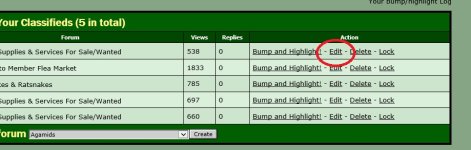
Now you should be looking at ALL the ads you have placed. And note the arrows pointing to two areas of interest. The arrow in the upper right hand corner points to the option to bump and/or highlight the ad in the display that it refers to. You can also delete the ad (maybe, there may still be some permission problems with this), or you can lock/unlock the ad. Locking will prevent someone from making replies to that ad thread, if you desire to have it that way.
The arrow at the bottom left of the screen points to a convenient method you can use to create a NEW classified ad by selecting the area you want this ad to appear.
So suppose you click on the Bump and Highlight link....

From this screen you can select the color scheme you want for the highlighting of your classified ad. Note the bottom left arrow pointing to the checkbox that will allow you to have ad bumping optional, if you desire NOT to have it bumped. If you DON'T want the ad bumped, simply uncheck the checkbox before clicking on the PROCEED button.
Well pretty much, that is it. Just a new toy to play around with on this site, so have fun with it!
When I decided to run both classifieds concurrently, I was curious to see if one method of advertising here would gradually replace the other just based on usage. Which did not happen. Both seem to be equally popular, it seems.
So with that in mind, I decided to resurrect the classifieds control panel anyway, as I felt it was very useful to people using the forum based classifieds section.
As for the highlighting and bumping, that actually was a bit of a headache and not really worth while, PayPal's cut out of each $1 was substantial, and I felt that I was doing this more for PayPal's sake than anything else.
So, with the NEW classified control panel, it has the thread topic line highlighting and bumping functions built in as benefits of the paid memberships on a graduated scale:
- Participant - 3 per month
- Contributor - 10 per month
- Benefactor - 50 per month
- Endowment - 200 per month
Now I know someone is going to ask me if this is per calendar month, or does the month start when you initiate the first bump/highlight. Right now, I just don't know.
First off, here's how you get to the Classifieds Control Panel via one of two methods:
(1) Go into your User CP menu by clicking on the link that says User CP in the green menu bar at the top of any page. You will then see this display:
Note the arrow pointing to the link you want to click on in order to go to the classifieds CP menu itself.
(2) Or as an alternative, you can use the Quick Links menu, which is also found in the green menu bar above. When the menu is displayed, simply click on the link for Classifieds CPanel:
So, now you are in the Classifieds Control Panel display. Bear in mind that you will only see worthwhile info if you already have classified ads existing in the forum based classifieds section. This does NOT interface with the photo based classified section at all.
But if you have forum based classifieds, you will see something similar to this:
Now you should be looking at ALL the ads you have placed. And note the arrows pointing to two areas of interest. The arrow in the upper right hand corner points to the option to bump and/or highlight the ad in the display that it refers to. You can also delete the ad (maybe, there may still be some permission problems with this), or you can lock/unlock the ad. Locking will prevent someone from making replies to that ad thread, if you desire to have it that way.
The arrow at the bottom left of the screen points to a convenient method you can use to create a NEW classified ad by selecting the area you want this ad to appear.
So suppose you click on the Bump and Highlight link....
From this screen you can select the color scheme you want for the highlighting of your classified ad. Note the bottom left arrow pointing to the checkbox that will allow you to have ad bumping optional, if you desire NOT to have it bumped. If you DON'T want the ad bumped, simply uncheck the checkbox before clicking on the PROCEED button.
Well pretty much, that is it. Just a new toy to play around with on this site, so have fun with it!