• Responding to email notices you receive.
    **************************************************
    In short, DON'T! Email notices are to ONLY alert you of a reply to your private message or your ad on this site. Replying to the email just wastes your time as it goes NOWHERE, and probably pisses off the person you thought you replied to when they think you just ignored them. So instead of complaining to me about your messages not being replied to from this site via email, please READ that email notice that plainly states what you need to do in order to reply to who you are trying to converse with.

  • IMPORTANT! PLEASE READ!! About the Google Adsense ads being displayed

    =====================
    Posted 08/15/2025
    =====================


    Yeah, I know. They are a pain in the butt. But they pay the bills to keep my server running. Just a fact of life, I am afraid.

    Want to get rid of them? Simple. Just become a Contributor level member or above and they will be gone. -> Please click HERE."

    Is that too much for me to ask of you to keep this site running? Well, sorry about that. I too wish I could get everything for free. But alas.....

    =====================
    Addendum: 01/10/2026
    =====================


    Google Adsense ad revenue for December, 2025 was just $30 over the cost of the lease for the server running this site. So, in effect, the money providing the incentive for me to continue running this site is coming SOLELY from the paid memberships and sponsorships here. Which honestly ain't much....

Difficulty logging in: directed to login to www. page despite typing it in manually

snowgyre

Well-known member
Joined
Jun 12, 2005
Messages
2,329
Reaction score
375
Points
83
Age
45
Location
Tifton, GA
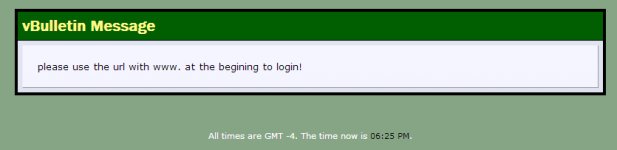
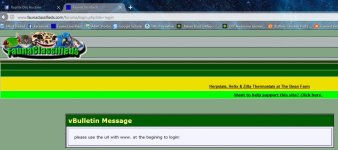
For the past three days I've had troubling logging in. I've attached a screenshot of the error code I get. It tells me to log in to the www. site. I have:

1. Disabled ad block (although most ads were already allowed)
2. Disabled NoScript (although this was never a problem before)
3. Manually typed in www.faunaclassifieds.com
4. Manually typed in http://www.faunaclassifieds.com
5. Tried Firefox and Chrome.

In both browsers after the steps above it still takes a half dozen tries to log in. I am also logged out after every instance of being offline for 12 hours, and this is the only page I am losing cookies for (or perhaps cookies are no longer being saved by Fauna?).

I can only login if I first try to login, then get this error page, and reload the error page. Instead of being directed to login again, I am instead successfully logged in. It's very strange.

Is anyone else having this issue?
 

Attachments

  • fauna error.jpg
    fauna error.jpg
    144.1 KB · Views: 88
I'm having the same issue too.
I previously chalked it up to an old computer, I still think it might be the case.
Do you use Chrome? If so are you 'also" getting warnings from Google that your version of Chrome is outdated and no longer supported on your operating system?

Edit: Sorry, just saw you listed Chrome.
 
I had two others contact me about this problem yesterday, and my server admin techs supposedly corrected the problem. Still not sure how this happened, as it had been working like it should beforehand.

I asked those other two persons who brought this to my attention to check for me, and according to them, the problem has been resolved.

Are YOU still having the problem? If so, have you cleared whatever caching your browser uses to make certain you are not using the cache instead of going directly to my server? I have the settings in the admin panel set so that caching does not take place on my server just for this very reason.
 
As a test, go to the URL prompt in your browser and type in "faunaclassifieds.com". It should automatically change to "www.faunaclassifieds.com" to show that the correction at the server is working.
 
I had something sort of similar happen yesterday, not the message about www. but logging on and the normal page would pop up saying 'logging you on' and then the refreshed page would show I was still not logged on. It's been working fine today however.
 
As a test, go to the URL prompt in your browser and type in "faunaclassifieds.com". It should automatically change to "www.faunaclassifieds.com" to show that the correction at the server is working.

1. Deleted all Browser history
2. Ran Windows System Tools: Disc Cleanup
3. Restarted computer

Ended up on the same error.
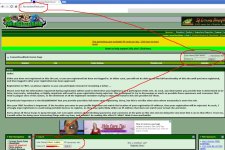
Just tried the "faunaclassifieds.com" test. Did not automatically change over.
 

Attachments

  • eeee.jpg
    eeee.jpg
    60.2 KB · Views: 78
  • t.jpg
    t.jpg
    301.2 KB · Views: 82
ISP servers as well as intermediate ones also tend to use caching since it will give the appearance of speeding up URL requests to the same pages from the same requester.

But not sure why others will have the problem that was addressed yesterday, and supposedly fixed then. :shrug01: Might be a case where the situation on my server just has to propagate throughout server land.
 
Seems odd that beginning is misspelled in the error message. (all lower case seems odd, too, but I don't pay much attention; so that could be normal?)
 
I just got the "www required" error for the first time. Before then I would have to log in every time I came back to the site, even if I selected the "Remember Me?" checkbox.
 
I just made a change to one of the config files on my server. Let's see if that makes any difference.
 
Back
Top