• Responding to email notices you receive.
    **************************************************
    In short, DON'T! Email notices are to ONLY alert you of a reply to your private message or your ad on this site. Replying to the email just wastes your time as it goes NOWHERE, and probably pisses off the person you thought you replied to when they think you just ignored them. So instead of complaining to me about your messages not being replied to from this site via email, please READ that email notice that plainly states what you need to do in order to reply to who you are trying to converse with.

  • IMPORTANT! PLEASE READ!! About the Google Adsense ads being displayed

    =====================
    Posted 08/15/2025
    =====================


    Yeah, I know. They are a pain in the butt. But they pay the bills to keep my server running. Just a fact of life, I am afraid.

    Want to get rid of them? Simple. Just become a Contributor level member or above and they will be gone. -> Please click HERE."

    Is that too much for me to ask of you to keep this site running? Well, sorry about that. I too wish I could get everything for free. But alas.....

    =====================
    Addendum: 01/10/2026
    =====================


    Google Adsense ad revenue for December, 2025 was just $30 over the cost of the lease for the server running this site. So, in effect, the money providing the incentive for me to continue running this site is coming SOLELY from the paid memberships and sponsorships here. Which honestly ain't much....

IMG code not working?

FireStorm

New member
Joined
Aug 21, 2006
Messages
1,280
Reaction score
60
Points
0
Age
40
Location
Plant City Florida
I've always been able to post pics using photobucket and just copying and pasting the IMG code they provide. I've tried 4 times and I cannot make this work. Here is the pic I am trying to post:
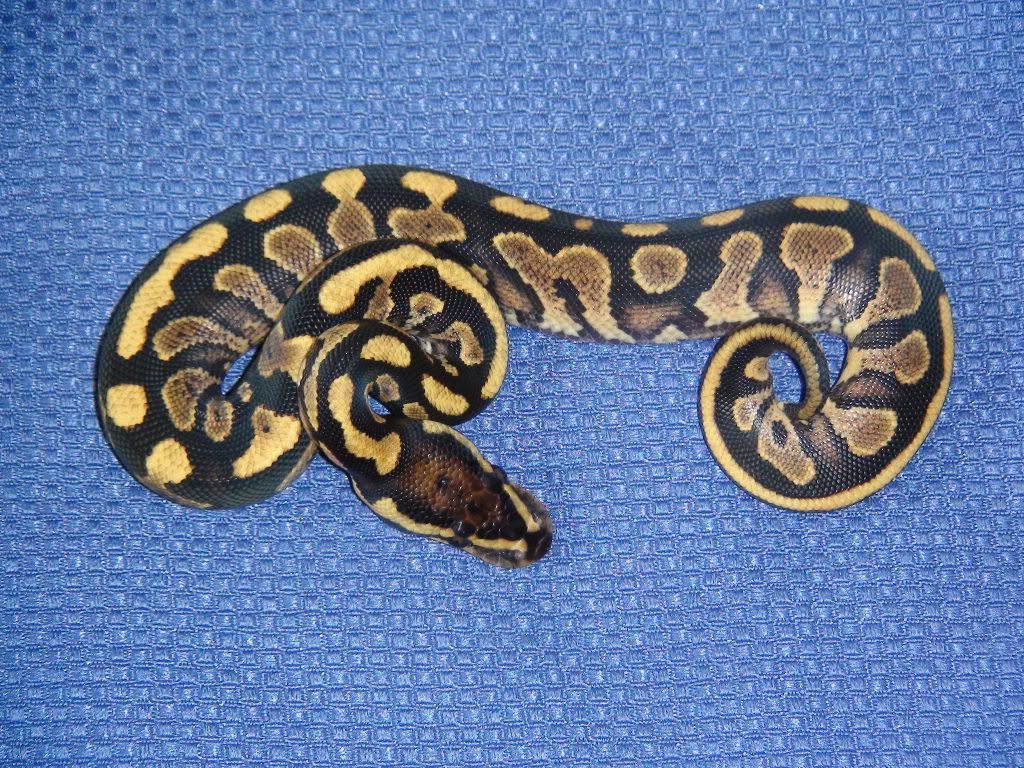
DSC04006.jpg


If someone can tell me what I am doing wrong, I would greatly appreciate it. I've never had trouble with this before:eek:. I've even tried 2 different computers...
 
Might be some issue with Photobucket. I just now tried it myself, and I can't even get the link to copy. Kinda stuck on Ubuntu right now, though. Not sure if it's a Photobucket thing or an OS issue.
 
looks like you copied the wrong photobucket link, you were trying to post the URL as an image. I changed the brackets to { }, this is what you tried to post:
{IMG}{URL="http://i221.photobucket.com/albums/dd247/Roseland2007/DSC04006.jpg%5B/IMG%5D"}http://i221.photobucket.com/albums/dd247/Roseland2007/DSC04006.jpg{/IMG}{/URL}

so that is why it wasn't working. here you go:

DSC04006.jpg
 
Your direct link worked fine. Not sure what's going on with my issue. I can't copy or even highlight the link I want to post. Weird. Again, damn you, Linux!
 
looks like you copied the wrong photobucket link, you were trying to post the URL as an image. I changed the brackets to { }, this is what you tried to post:
{IMG}{URL="http://i221.photobucket.com/albums/dd247/Roseland2007/DSC04006.jpg%5B/IMG%5D"}http://i221.photobucket.com/albums/dd247/Roseland2007/DSC04006.jpg{/IMG}{/URL}

so that is why it wasn't working. here you go:

DSC04006.jpg
I'm still lost. I copied the line on photobucket that says IMG code. I thought that is what I've always done. Gonna try it again. This time I will type instead of copy and paste:
dsc04006.jpg
 
Well since that worked I guess my computer was somehow turning what I copied into a link and messing it up...still confused. Guess I just have to type it by hand.
 
Oops - should have looked at all the responses before I fixed the link in the original post, lol.
April's explanation was correct, in that the IMG code was sort of buried in the URL code, which didn't translate well. I removed the surrounding URL code in your opening post, leaving it to show just the IMG code (which is why the image is there now).
 
I'm still lost. I copied the line on photobucket that says IMG code. I thought that is what I've always done. Gonna try it again. This time I will type instead of copy and paste:
imghttp://i221.photobucket.com/albums/dd247/Roseland2007/dsc04006.jpg /img

I try to plug in that link but it says not found.

where are you clicking? Which code do you copy? What are you typing?

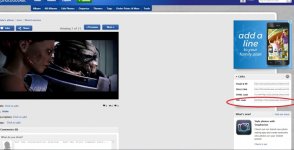
I got this to show by copy/paste the code from the area circled in red in the screenshot below
Garrus2.jpg
 

Attachments

  • photobucket.jpg
    photobucket.jpg
    91.3 KB · Views: 101
I'm still lost. I copied the line on photobucket that says IMG code. I thought that is what I've always done. Gonna try it again. This time I will type instead of copy and paste:
dsc04006.jpg

When you grab the IMG code, it should look like this:
IMG ] (space inserted before the last bracket by me - take it out, and the picture works).
 
That is what I clicked, it said copied, then I hit paste. I have no idea how the other code got in there. I swear this computer must have a gremlin. It's not my usual computer, and I've never had this issue before on my other computers. I've posted photos before just fine...guess I just can't do it from here (or I will have to type it out by hand).
 
ok you stumped me. : )
Maybe the PC you are using has some sort of default to change all links to hyperlinks which is adding the URL coding on.
 
I think it must be something like that. I've never had that happen before so I was baffled. Thanks for taking the time to help:). And out of curiosity, how were you able to see what had actually posted? Is it something to do with being a mod? All I could see was the IMG code that wasn't working, but it was blue, like a link.
 
Yes - a mod thing - I accessed your post via our editing feature...saw the jumbled code, and removed the extra parts.
 
And out of curiosity, how were you able to see what had actually posted?

I quoted your post and was able to see what coding you used by doing that
:)

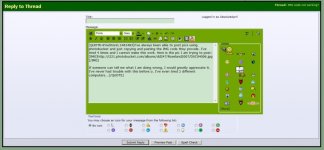
here's a screenshot of what I see, since I'm in a screen shot taking mood today
:D
of course it shows the corrected code now since Harald went into your post and fixed it.
 

Attachments

  • IMGcode.jpg
    IMGcode.jpg
    76.7 KB · Views: 88
Back
Top