


-
Responding to email notices you receive.
**************************************************
In short, DON'T! Email notices are to ONLY alert you of a reply to your private message or your ad on this site. Replying to the email just wastes your time as it goes NOWHERE, and probably pisses off the person you thought you replied to when they think you just ignored them. So instead of complaining to me about your messages not being replied to from this site via email, please READ that email notice that plainly states what you need to do in order to reply to who you are trying to converse with.
-
IMPORTANT! PLEASE READ!! About the Google Adsense ads being displayed
=====================
Posted 08/15/2025
=====================
Yeah, I know. They are a pain in the butt. But they pay the bills to keep my server running. Just a fact of life, I am afraid.
Want to get rid of them? Simple. Just become a Contributor level member or above and they will be gone. -> Please click HERE."
Is that too much for me to ask of you to keep this site running? Well, sorry about that. I too wish I could get everything for free. But alas.....
=====================
Addendum: 01/10/2026
=====================
Google Adsense ad revenue for December, 2025 was just $30 over the cost of the lease for the server running this site. So, in effect, the money providing the incentive for me to continue running this site is coming SOLELY from the paid memberships and sponsorships here. Which honestly ain't much....
You are using an out of date browser. It may not display this or other websites correctly.
You should upgrade or use an alternative browser.
You should upgrade or use an alternative browser.


Looking at the ad entitled "Pair of stardust diamonds", I am not seeing the author using the file attachment function to attach a photo to their ad in that manner. Without using that "attach" function, no, there will not be an image displayed as a thumbnail for the ad.
Although the two images state they are "uploaded", they are in reality only embedded as IMG codes within the ad text itself. They MUST use the attachment function for the thumbnail operation to work.
I have a pair of RPDs up for sale for the time being anyway. Pair was produced by Dave Sutton in 2015 and purchased by me last year. Both are on FT rats and just came out of cooling. They have been cooled every year and grown slow as diamonds should be. Both can be handled with no problems. I will only sell as a pair. Both are pure Cypress Creek x Geb Bailey and came form Dave's pure stock from 2003. This pair is 3k shipped with in the US.[IMG]https://uploads.tapatalk-cdn.com/20190223/69f7bab94d2c8c43634b65c1b98b56c5.jpg[/IMG][IMG]https://uploads.tapatalk-cdn.com/20190223/8c2400249d40658a33c7ace07b3e9338.jpg[/IMG]
Sent from my SM-G955U using Tapatalk
Although the two images state they are "uploaded", they are in reality only embedded as IMG codes within the ad text itself. They MUST use the attachment function for the thumbnail operation to work.
Makes sense. I don't have Tapatalk installed so I can't test the difference between the two.

Rich, there have been recurring upload failures for attaching photos yesterday into today. I was able to help some members last night, but now it is not even letting me do so in my own posts. Not sure what has changed, as my manner of attaching has not changed. I am wondering if the automatic resizing that used to occur might not be functioning as well as before, but that is a shot in the dark on my part.
"Upload of file failed."
That is the message I get in the attachment window.
Not on Tapatalk, btw. Plain old Windows PC. Which, yes, I have restarted. lol
"Upload of file failed."
That is the message I get in the attachment window.
Not on Tapatalk, btw. Plain old Windows PC. Which, yes, I have restarted. lol




Well, those seemed to work.
What can you tell me about the files you were trying to upload, Nick? Location specific, maybe? Size?
All four of the above images were 800x533 pixels, file size varying from 40.9KB to 111.3KB.
Windows 10 desktop PC.
What can you tell me about the files you were trying to upload, Nick? Location specific, maybe? Size?
All four of the above images were 800x533 pixels, file size varying from 40.9KB to 111.3KB.
Windows 10 desktop PC.
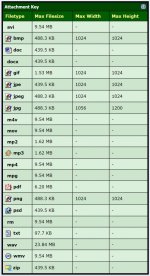
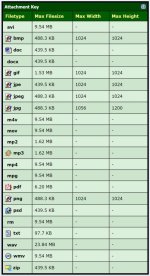
Hmm, both appear to have been uploaded. What is interesting is that the first one exceeds one dimension of the chart shown, yet the program didn't yelp nor reject the attempt to upload it.
Let me try a REALLY large image and see what happens.
Let me try a REALLY large image and see what happens.
Well, the image I tried to upload was 8256x5504 pixels, 15.6 megabytes in size. The upload failed, with this message displayed:

Your attachment request has reached our server without any data so we could not process it. Please try to send it again! If you are sending multiple attachements at once, uploading them one by one might help. It can also help to clear your browser's cache.
If you keep getting this error even after you cleared your browser's cache, please try to use a different browser to upload/handle attachements.
The images were 3.37MB to 3.40MB, but that would previously never cause me any problems and the process of uploading would have the site software automatically resize them into the 400kB+ range (which was convenient since it meant not having to resize them before uploading). I am guessing that is no longer within the tolerance of the automated resizing (if there is still automated resizing). The upload failure is new and is affecting others as well, so I do not think it is anything specific to my PC.
Windows 8 (I know, I know). Files are jpeg images from my SD card from my camera (Nikon Coolpix P900).
Update while typing this:
I just did a very quick resize to what a program claimed was 50%, which put them at 1.10MB to 1.12MB and tried to upload those. That worked - as in the site was able to automatically resize the images during the upload process as it used to for me with files 2X-3X the size.
Based on this, I am concluding that my thought of resizing tolerances having been lowered is likely correct. This may take extra steps for people now, as I know my camera and my phone take much larger images than 1MB (my real camera takes them at 3MB+ with defaults in place and I looked at a photo my phone was used to casually take a few days ago and that image was 5.60MB with default settings). It is not a big deal for me and will only slow things down very slightly when I want to put images into an ad or other post, but people who are not used to digging into their phone image manipulation settings and use their phones as their primary internet devices *might* have to figure some stuff out to get file sizes down to where the site's automated resizing achieves what it used to with larger files. This is not a complaint, but an observation. If people keep asking me, I will tell them to resize images first. Then upload.
Windows 8 (I know, I know). Files are jpeg images from my SD card from my camera (Nikon Coolpix P900).
Update while typing this:
I just did a very quick resize to what a program claimed was 50%, which put them at 1.10MB to 1.12MB and tried to upload those. That worked - as in the site was able to automatically resize the images during the upload process as it used to for me with files 2X-3X the size.
Based on this, I am concluding that my thought of resizing tolerances having been lowered is likely correct. This may take extra steps for people now, as I know my camera and my phone take much larger images than 1MB (my real camera takes them at 3MB+ with defaults in place and I looked at a photo my phone was used to casually take a few days ago and that image was 5.60MB with default settings). It is not a big deal for me and will only slow things down very slightly when I want to put images into an ad or other post, but people who are not used to digging into their phone image manipulation settings and use their phones as their primary internet devices *might* have to figure some stuff out to get file sizes down to where the site's automated resizing achieves what it used to with larger files. This is not a complaint, but an observation. If people keep asking me, I will tell them to resize images first. Then upload.
Actually, I was not aware that this site did any resizing at all for images. When I set it up many moons ago, it sure didn't do any, and the specification I set up were hard limits. So it seems that something must have changed to allow resizing, and then apparently went away. So perhaps it was actually something in the OS instead of the native vBulletin coding. Perhaps something to do with this image processing module(s) being used.
Server OS software and supporting modules are changing all of the time, which can present pretty much an infinite source of headaches. Sometimes known bugs and exploits are not fixed as specific patches, but are instead only rolled out during the next scheduled update. Which means that in order to get such bug fixes and hacker exploits plugged up, you often have to accept an update that might just break something else.
As for this particular problem, I'm still going to treat the limits stated for attachments as being HARD limits. If uploads exceed those limits, then the uploader will be on their own concerning getting it to work for them. There needs to be limits for image size as well as file size. If the software doesn't do it for you automatically, then I am afraid that such limits will have to be dealt with manually.
Server OS software and supporting modules are changing all of the time, which can present pretty much an infinite source of headaches. Sometimes known bugs and exploits are not fixed as specific patches, but are instead only rolled out during the next scheduled update. Which means that in order to get such bug fixes and hacker exploits plugged up, you often have to accept an update that might just break something else.
As for this particular problem, I'm still going to treat the limits stated for attachments as being HARD limits. If uploads exceed those limits, then the uploader will be on their own concerning getting it to work for them. There needs to be limits for image size as well as file size. If the software doesn't do it for you automatically, then I am afraid that such limits will have to be dealt with manually.
Yeah, it is not a big deal. I think some of us got soft because the resizing was happening (and still is to a different degree) without us doing anything, so when the tolerance or limit shifted, it took us by surprise a little. Now that I have tinkered with it a bit more, it is easy for me to simply tell people to resize their files and try again until it works. Want animal money? Put in an extra few minutes to work for it. Not a high hurdle at all.
I checked with my programmer and he felt that a setting that controls the max upload file size in PHP must have been altered. So I checked with my server guys, and apparently it was set kind of low. So they bumped it up substantially.
When anyone gets a chance, please test that attachment upload function again with files that would not work for you before. Let's see if that helped any.
When anyone gets a chance, please test that attachment upload function again with files that would not work for you before. Let's see if that helped any.
I will be crafting an ad very shortly and will check. Thanks for looking into it.
Improved. I could not get it to accept the full-file-size originals, so that persisted, but with a 50% resize, I could at least attach all four prior to upload whereas before I still had to upload one at a time. I can certainly live with this and I appreciate the improvement where it has applied.
What are the dimensions and file size of your originals?
And then after you resized them?
And then after you resized them?
For the first example that I tried after our posts today:
Original:
4608 x 3456 pixels
3.38 MB
Failed to upload.
After a resize using a 50% preset (which is a pixel thing from the look of the numbers):
2304 x 1728 pixels
888 KB
Successfully uploaded and allowed for multiples.
Original:
4608 x 3456 pixels
3.38 MB
Failed to upload.
After a resize using a 50% preset (which is a pixel thing from the look of the numbers):
2304 x 1728 pixels
888 KB
Successfully uploaded and allowed for multiples.
Hmm, according to what the server guys told me, the settings they made should have allowed your original images to post.
I took a look myself, as there are settings I can change myself to increase the memory allocation in PHP, so I increased the values to where I think your original images should upload properly. How about giving it a whirl and see if it works now?
I took a look myself, as there are settings I can change myself to increase the memory allocation in PHP, so I increased the values to where I think your original images should upload properly. How about giving it a whirl and see if it works now?


I'm glad it is not storing the original file on the server.
DSCN6888.jpg (225.8 KB)
Cuts it down quite a bit, it appears.