Sasheena
Imperfect
Okay, I know I can probably figure out what I did wrong eventually, but you guys have always been so helpful, I thoiught I would ask here first.
I love Microsoft Word, I use it all the time. For the first time I'm stumped...
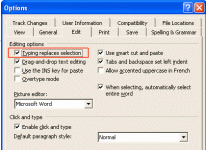
Normally when I modify something I've already created, I like to highlight the text that I plan on getting rid of, and as soon as it's highlighted, I start typing in the new text. This works well. The old text is deleted, the new text takes its place, and we're all quite happy...
The day before yesterday I was creating a document in word and all of a sudden it stopped deleting the stuff I'd highlight (usually I highlight by going to the beginning or end, holding the shift key, and highlighting the part to be deleted.). Now if I type in, for example: "Miami Vikings" and realize I have wrong team name, I would normally highlight the "vikings" and then I would start typing "Dolphins".... only when I do that now, this is what I get: "Miami DolphinsVikings".... it acts like I've just put the cursor at the beginning of the word instead of deleting it. Bleah! How do I get my old "MS Word" back?
Thanks in advance.
I love Microsoft Word, I use it all the time. For the first time I'm stumped...
Normally when I modify something I've already created, I like to highlight the text that I plan on getting rid of, and as soon as it's highlighted, I start typing in the new text. This works well. The old text is deleted, the new text takes its place, and we're all quite happy...
The day before yesterday I was creating a document in word and all of a sudden it stopped deleting the stuff I'd highlight (usually I highlight by going to the beginning or end, holding the shift key, and highlighting the part to be deleted.). Now if I type in, for example: "Miami Vikings" and realize I have wrong team name, I would normally highlight the "vikings" and then I would start typing "Dolphins".... only when I do that now, this is what I get: "Miami DolphinsVikings".... it acts like I've just put the cursor at the beginning of the word instead of deleting it. Bleah! How do I get my old "MS Word" back?
Thanks in advance.