• Responding to email notices you receive.
    **************************************************
    In short, DON'T! Email notices are to ONLY alert you of a reply to your private message or your ad on this site. Replying to the email just wastes your time as it goes NOWHERE, and probably pisses off the person you thought you replied to when they think you just ignored them. So instead of complaining to me about your messages not being replied to from this site via email, please READ that email notice that plainly states what you need to do in order to reply to who you are trying to converse with.

  • IMPORTANT! PLEASE READ!! About the Google Adsense ads being displayed

    =====================
    Posted 08/15/2025
    =====================


    Yeah, I know. They are a pain in the butt. But they pay the bills to keep my server running. Just a fact of life, I am afraid.

    Want to get rid of them? Simple. Just become a Contributor level member or above and they will be gone. -> Please click HERE."

    Is that too much for me to ask of you to keep this site running? Well, sorry about that. I too wish I could get everything for free. But alas.....

    =====================
    Addendum: 01/10/2026
    =====================


    Google Adsense ad revenue for December, 2025 was just $30 over the cost of the lease for the server running this site. So, in effect, the money providing the incentive for me to continue running this site is coming SOLELY from the paid memberships and sponsorships here. Which honestly ain't much....

Useless search feature

kliff619

New member
Joined
Jul 8, 2007
Messages
3
Reaction score
0
Points
0
Age
37
Location
albuquerque
What the point of having that useless a$$ search feature for the classifieds?
For example go to ball python and search " pied ball python" Nothing! and try to search "zero morph" or "zero morph bearded dragon" again nothing! Just seems like a waste of time to have a search feature if it doesnt work. Admins there are plenty of forum templates with working search functions please contact me if you need the help with recommendations for a better fuctions
 

Attachments

  • 3.jpg
    3.jpg
    53.2 KB · Views: 163
  • 4.jpg
    4.jpg
    163 KB · Views: 154
I ran a few searches in different sections...the only one that got no hits was "zero" in Bearded Dragons. I didn't look; but it could be that there are no ads for them.
As far as not being able to find pieds, are you sure you searched the ads (as opposed to the Sponsor list, which is the first Search button shown)?
 
I ran a few searches in different sections...the only one that got no hits was "zero" in Bearded Dragons. I didn't look; but it could be that there are no ads for them.
When I searched "zero morph" in the BD classifieds, it wouldn't accept "zero" as a search term; but, oddly enough, still yielded a zero morph hit.

As far as not being able to find pieds, are you sure you searched the ads (as opposed to the Sponsor list, which is the first Search button shown)?
That was my initial assumption, as I could swear that the top search box used to only search through the sponsors. Apparently, that's not the case anymore. All the searches I tried yielded hits while using the upper search function.
 

Attachments

  • 5.jpg
    5.jpg
    110.9 KB · Views: 167
My issue is with the search feature is that I'm usually on my phone and it doesn't allow me to edit the search field before my phone moves away from it. It's frustrating but I'm sure if I was on my computer or in the app it would function better.
 
My issue is with the search feature is that I'm usually on my phone and it doesn't allow me to edit the search field before my phone moves away from it.
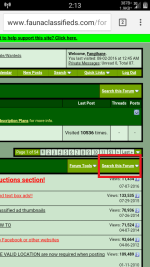
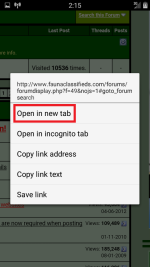
It's also kinda broken on my phone, too. If you're using an Android device, I may have found an odd little workaround for that, using Firefox Browser. If it works for you at all, it may be more of a PITA than you're looking for, but here it is:
1) Long-press on the "Search this Forum" link.
2) When the pop-up menu appears, choose "Open in New Tab."
3) Open up the new tab and scroll all the way to the bottom. If it works the same way for your phone as it does for mine, there should be a search text-entry field down there now.
 

Attachments

  • Screenshot_2016-08-02-02-13-30.png
    Screenshot_2016-08-02-02-13-30.png
    118.4 KB · Views: 109
  • Screenshot_2016-08-02-02-15-31.png
    Screenshot_2016-08-02-02-15-31.png
    85.3 KB · Views: 112
  • Screenshot_2016-08-02-02-15-50.png
    Screenshot_2016-08-02-02-15-50.png
    179.2 KB · Views: 115
I have an Android phone, and use a similar method: I (normal) press the first search button, then long press on Advanced Search. Open that in another tab, and proceed.
(A lot of times, I'm looking for entries by a specific person, which the Advanced Search accommodates. )
 
I (normal) press the first search button, then long press on Advanced Search.
On my phone, the "Search this Forum" link is completely unresponsive. I can tap it all day and not a thing happens. The only way I've been able to get to a text-entry field, is with the that little workaround I mentioned. Oddly enough, on my tablet - also running KitKat 4.4 - that link does work, yet behaves in the same way that DezC described. :shrug01:
 
Back
Top