• Responding to email notices you receive.
    **************************************************
    In short, DON'T! Email notices are to ONLY alert you of a reply to your private message or your ad on this site. Replying to the email just wastes your time as it goes NOWHERE, and probably pisses off the person you thought you replied to when they think you just ignored them. So instead of complaining to me about your messages not being replied to from this site via email, please READ that email notice that plainly states what you need to do in order to reply to who you are trying to converse with.

  • IMPORTANT! PLEASE READ!! About the Google Adsense ads being displayed

    =====================
    Posted 08/15/2025
    =====================


    Yeah, I know. They are a pain in the butt. But they pay the bills to keep my server running. Just a fact of life, I am afraid.

    Want to get rid of them? Simple. Just become a Contributor level member or above and they will be gone. -> Please click HERE."

    Is that too much for me to ask of you to keep this site running? Well, sorry about that. I too wish I could get everything for free. But alas.....

    =====================
    Addendum: 01/10/2026
    =====================


    Google Adsense ad revenue for December, 2025 was just $30 over the cost of the lease for the server running this site. So, in effect, the money providing the incentive for me to continue running this site is coming SOLELY from the paid memberships and sponsorships here. Which honestly ain't much....

Free online photography lessons

This is a great thread!

I borrowed my dad's SRL and took photos of my snakes. I don't know how to use it well, so I often just switch the settings from Macros to M to P , etc and see what looks okay. Any suggestions would be greatly appreciated, I know there's so much more I could do if I only had someone to show me how to properly photograph with this camera. :)


What look are you after. You can do so much with a SLR or DSLR
 
I really want a macro photo of a snake's head that is clear and shows more than what you could see with the naked eye....snakes don't really have "expressions", but it would be nice to have a photo that isn't just trying to show the colors...but more of the personality/behavior of the animal. :)
 
I couldn't pull any EXIF data off the photo above.... so Im just gonna have to take a stab in the dark. If your wanting the entire head in focus on a closeup shot... your gonna have to stop down your lens. You will need to change your apature to f/20 or higher. By doing this you are reducing the amount of light that his hitting the sensor and you really dont want to slow down the shutter speed to much because then you risk blur with body movements. You will have to use a flash on these shots.

Best advice I can give on this one... is to play with the settings till you get the look your after. Id start around f/16 and work my way up to whatever your lens can handle.

Now if your wanting closeups like this one

EasternHoggie1441-web.jpg


you may need to buy more equipment. With this shot I was using a Tamron 28/300mm macro lens, 1.4x tele, and a small extension tube so I could physically get closer and still be able to focus.

For that shot above I was using an external flash. My shutter was 1/200, ISO 400, apature f/22, Focal length 300mm.

Even at f/22 I didnt have enough depth of field (DOF) to get the whole face in focus. In order to get the whole face in focus I would have had to stop the lens down even further... maybe f/32

Hope this helps... if not... I'll try to answer anymore questions I may have caused

 
Taken with a Canon Xti (EOS) using EFS 18-55 zoom lens

Like a lot of others, I want a close up that shows every detail!
 

Attachments

  • IMG_7842.jpg
    IMG_7842.jpg
    143.9 KB · Views: 69
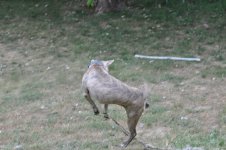
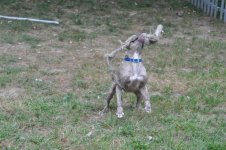
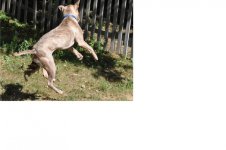
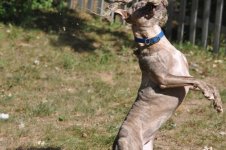
I was playing with the dog yesterday, and tried to get a few pics of him at play. Most were horrible, and I think I understand why. Here are the only two I am willing to show, lol.

The pics were with a Nikon D90, 70-300mm lens, set on auto. It was an overcast day, and the auto setting didn't allow enough light or a fast enough shutter time to stop the action, so things were blurred.
 

Attachments

  • 001.jpg
    001.jpg
    144.2 KB · Views: 105
  • 002.jpg
    002.jpg
    200.4 KB · Views: 70
Same camera, lens, dog, and chewed up rope toy...it is a brighter morning, and I remembered to flip over to the sport mode setting.
I missed a couple of great shots just because I didn't have time to adjust the lens when he decided to flip the rope up...but the pics themselves were clearer. You can even see the grass, leaves, and dirt he kicks up.
(The first shot is smaller because I was playing around trying to crop it in paint before resizing to post here - we had a disagreement, and I think I lost :shootfoot ) The second one, well a couple of obvious problems, the biggest being that I didn't have a chance to back off the zoom - he decided to toss it on the way back to me.
 

Attachments

  • Kriss at play.jpg
    Kriss at play.jpg
    109.8 KB · Views: 100
  • 001.jpg
    001.jpg
    163.6 KB · Views: 331
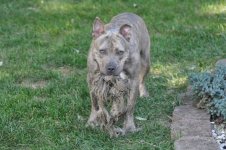
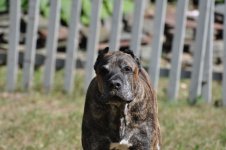
Lastly, a quiet moment considering... and Blade huffing about the neighbor (not a good shot, but I wanted to include the old guy, too).
 

Attachments

  • 004.jpg
    004.jpg
    202.9 KB · Views: 354
  • 003.jpg
    003.jpg
    113 KB · Views: 297
Taken with a Canon Xti (EOS) using EFS 18-55 zoom lens

Like a lot of others, I want a close up that shows every detail!

For more of a close up.... add an extension tube between the lens and camera body. That will allow you to physically move the camera closer and still be able to focus.

If you cant move closer because of your subject... add a 1.4x teleconverter between the lens and camera body. That will magnify what the lens sees by 1.4 times.
 
For more of a close up.... add an extension tube between the lens and camera body. That will allow you to physically move the camera closer and still be able to focus.

If you cant move closer because of your subject... add a 1.4x teleconverter between the lens and camera body. That will magnify what the lens sees by 1.4 times.

I can get right up on them, but my camera won't focus, won't even shoot when I am that close.
 
Harald... On the first set of shots.... I wasnt able to pull any EXIF data off the photo. What is the ISO setting. On overcast days.... you can bump it up a bit to compensate... and thus will improve your shutter speed.
 
Harald.. on your last set of shots where your dog is stationary.... try cropping it as a vertical image. You loose all the dead space both the left and right and will come out with a nice portrait of your dog.
 
Harald... On the first set of shots.... I wasnt able to pull any EXIF data off the photo. What is the ISO setting. On overcast days.... you can bump it up a bit to compensate... and thus will improve your shutter speed.
Day one (auto)
ISO 320
shutter 1/125

Day two (sports)
ISO 400
exposure time 1/1600

Harald.. on your last set of shots where your dog is stationary.... try cropping it as a vertical image. You loose all the dead space both the left and right and will come out with a nice portrait of your dog.
I'm going to have to try messing with cropping in the Nikon program...I tried to do it in paint; but, before resizing, I was limited by the field shown in the monitor.
 
Day one (auto)
ISO 320
shutter 1/125

Day two (sports)
ISO 400
exposure time 1/1600


I'm going to have to try messing with cropping in the Nikon program...I tried to do it in paint; but, before resizing, I was limited by the field shown in the monitor.

I keep my ISO set to 400 unless I need to raise it.

Just for an experiment. Go outside on an overcast day and take one shot on auto.... then switch over to sports and compair the numbers. :thumbsup:

Just with what you posted above... you can see the sports setting automatically raised your ISO setting so it could then raise your shutter speed.
 
If your wanting the entire head in focus on a closeup shot... your gonna have to stop down your lens. You will need to change your apature to f/20 or higher. By doing this you are reducing the amount of light that his hitting the sensor and you really dont want to slow down the shutter speed to much because then you risk blur with body movements. You will have to use a flash on these shots.

Best advice I can give on this one... is to play with the settings till you get the look your after. Id start around f/16 and work my way up to whatever your lens can handle.

Now if your wanting closeups like this one

EasternHoggie1441-web.jpg


you may need to buy more equipment. With this shot I was using a Tamron 28/300mm macro lens, 1.4x tele, and a small extension tube so I could physically get closer and still be able to focus.

For that shot above I was using an external flash. My shutter was 1/200, ISO 400, apature f/22, Focal length 300mm.

Even at f/22 I didnt have enough depth of field (DOF) to get the whole face in focus. In order to get the whole face in focus I would have had to stop the lens down even further... maybe f/32

Hope this helps... if not... I'll try to answer anymore questions I may have caused

I think that should be the fix to a problem I've been experiencing. I've got a Sigma 150mm macro, but have an awful time getting things into focus during macro work (its fine if I'm just using it for random pics - like that rabbit and garter snake I happened across while doing bug shots). I had been learning quite a bit about the settings & how to use them...but life intervened and I put the book down. Once I'm settled in from the move, I'll be picking it back up.
Thanks, Kevin!
 
Your welcome Harald... and If you have any questions... Im here to answer them. All you have to do is ask them :thumbsup:

I dont know it all... but Im more than willing to share what I know.
 
Back
Top