• Responding to email notices you receive.
    **************************************************
    In short, DON'T! Email notices are to ONLY alert you of a reply to your private message or your ad on this site. Replying to the email just wastes your time as it goes NOWHERE, and probably pisses off the person you thought you replied to when they think you just ignored them. So instead of complaining to me about your messages not being replied to from this site via email, please READ that email notice that plainly states what you need to do in order to reply to who you are trying to converse with.

  • IMPORTANT! PLEASE READ!! About the Google Adsense ads being displayed

    =====================
    Posted 08/15/2025
    =====================


    Yeah, I know. They are a pain in the butt. But they pay the bills to keep my server running. Just a fact of life, I am afraid.

    Want to get rid of them? Simple. Just become a Contributor level member or above and they will be gone. -> Please click HERE."

    Is that too much for me to ask of you to keep this site running? Well, sorry about that. I too wish I could get everything for free. But alas.....

    =====================
    Addendum: 01/10/2026
    =====================


    Google Adsense ad revenue for December, 2025 was just $30 over the cost of the lease for the server running this site. So, in effect, the money providing the incentive for me to continue running this site is coming SOLELY from the paid memberships and sponsorships here. Which honestly ain't much....

How can someone search for all my posted ads/threads?

Zonata64

Member
Joined
May 28, 2004
Messages
545
Reaction score
2
Points
18
Age
61
Location
El Paso, Texas
I have had people who ask me "What else do you have available." I am not going to relist everything I have available in a text or email. How can someone pull up all my ads/threads? I have tried to search for all my threads/ads with the search function but can't seem to find away to pull them all up. Actually can't pull up any of them. Help please!
 
Go to your profile.
Hit 'statistics'.
Hit 'find all classifieds by Zonata64'.
Copy the URL from the page that lists all your ads, and give that link to whoever you want.
 
Thanks for your help. Only issue is I don't/won't use Fauna Classifieds on my phone. I use my desk top computer to post ads and hope people contact me via email (desk top only) or text. Hate doing stuff on my little smart phone screen and keyboard. Can't copy and past the Fauna link into a text. Would have to write it - what a pain. It would be nice if the inquiring party could look it up themselves. Any option for that? Thanks again for your help.
 
Well, once you got it onto your phone somewhere you could cut and paste it from, you'd have it on your phone. You could cut and paste that link in your desktop browser, email it to yourself, check your email on your phone, cut and paste the link into Notes or whatever app on your phone would work and cut and paste it from there whenever you need it to put into a text.

You could also put the link into each of your Fauna ads when you post an ad: "see the rest of my available animals here [link]". I have a basic block of text in each of my ads that includes link to my TOS, shipping info, etc that I simply cut and paste into each new ad -- you might think about arranging your ads that way for ease of posting new ones. Then when you post an ad you just cut and paste the basic ad from a previous one, add details about the specific animal, add a photo and you're done.
 
Thanks for the help.

Yea part 1 of your response is not going to happen. I don't do email on my phone. I tried to one time and it wanted to download 10,000 email messages. Deleted all that. Plus I love not having email, Facebook and the like on my phone. Again tiny little screen/keyboard nothing but a pain. The camera takes shitty pictures so use a real digital camera and upload to the desk top.

Part 2 of your help sounds like the ticket. I do have a basic ad template that I use for all my ads.

But still don't understand why Fauna doesn't have a search feature by username.

Thanks again for the help.
 
But still don't understand why Fauna doesn't have a search feature by username.

Well, it does -- it is the procedure I outlined (username, profile, statistics, 'find all classifieds by'). That works for any registered user to find ads from any other user. Perhaps a simple way to explain this to buyers is to say "go to my profile and you'll see a link to my other ads". Hopefully even the Facebook generation can figure out how to go from there.

Another way to search is to use the general site search button, specify 'advanced search', leave the keyword box empty, specify the seller's username in 'search by username' field, and select the 'reptile and amphibian classifieds' in the 'search in forum(s)' field. That will spit out all the ads by the specified user, and none of the discussion posts by that user. This is a little more putzy, but the search tool here is quite decent (compared to, say, Xenforo's which is often nearly unusable).

There is only one more click needed to go from one of my ads to my other ads here compared to the custom software that the other classified site runs. Considering vBulletin is over 20 years old, this isn't a big difference at all.
 
They can also click on the "ads" button at the bottom of any of your posts.
 

Attachments

  • 378D16B5-4203-43DD-BB3B-A6DA997BD4AC.jpg
    378D16B5-4203-43DD-BB3B-A6DA997BD4AC.jpg
    382.5 KB · Views: 117
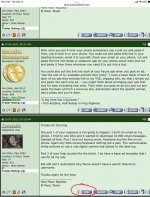
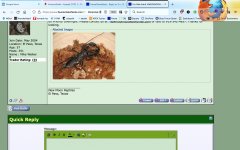
Jason, I'm not seeing that button on anyone's ads, including my own. Looks like that's a mod tool (either purposefully or there's a glitch and it is supposed to appear for all users).
 
Jason, I'm not seeing that button on anyone's ads, including my own. Looks like that's a mod tool (either purposefully or there's a glitch and it is supposed to appear for all users).

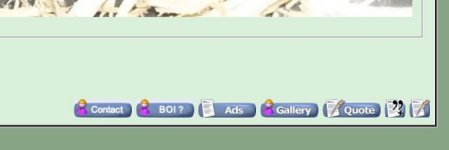
Can you provide a screen shot of what you are seeing in that area? You SHOULD be seeing those buttons, excluding the Edit one. That is a moderator/admin only function when viewing another member's posts.

I logged into a test account I have set up and I certainly DO see that Ads button. I also assigned a paid membership level to that test account and still see that Ads button.

Looking at an ad in one of the classified sections here, this is what I see under my test account (as a registered/Benefactor level member):
 

Attachments

  • post_buttons_01.JPG
    post_buttons_01.JPG
    15 KB · Views: 137
Hmm, well that IS odd. Anyone else happening to be reading this thread having the same problem?

Out of curiosity what sort of device are you using to view the forums?
 
12" Macbook (2017), OS 10.14.6, up to date Firefox, VPN.

I checked on Safari (12.1.2 -- which is really old -- same machine and VPN) and I do see the 'ads' button from my account.

On mobile (iPhone 8, iOS 15.6.1 -- which isn't current -- Safari, same VPN service) and I do see the 'ads' button from my account.

So, things look normal on dated browsers, but not on a current one.
 
12" Macbook (2017), OS 10.14.6, up to date Firefox, VPN.

I checked on Safari (12.1.2 -- which is really old -- same machine and VPN) and I do see the 'ads' button from my account.

On mobile (iPhone 8, iOS 15.6.1 -- which isn't current -- Safari, same VPN service) and I do see the 'ads' button from my account.

So, things look normal on dated browsers, but not on a current one.
The button is named as "ads" so I suspect your firefox (probably a plugin it has) is considering it as advertisement and blocking it.
 
Actually, I am using FireFox myself without an issue, so perhaps there is a plugin being used by some people that is being just a bit too stringent in it's ad blocking.

I didn't think these ad blocking programs would be smart enough to read a graphic image for content, so is there a possibility (if being used) to disable the alternate text string displayed if the graphic image hasn't loaded? Back in my programming days seems there was code for that sort of thing in HTML.

Anyway, this spam blocking shtuff can really gum up the works sometimes.
 
Toggling things on and off on my end indicates that uBlock Origin and AdBlocker Ultimate remove the 'ads' button.

Thank you for taking the time to figure out that wrinkle.

So I am going to call this as being an operator-end issue. :)
 
Back
Top