• Responding to email notices you receive.
    **************************************************
    In short, DON'T! Email notices are to ONLY alert you of a reply to your private message or your ad on this site. Replying to the email just wastes your time as it goes NOWHERE, and probably pisses off the person you thought you replied to when they think you just ignored them. So instead of complaining to me about your messages not being replied to from this site via email, please READ that email notice that plainly states what you need to do in order to reply to who you are trying to converse with.

  • IMPORTANT! PLEASE READ!! About the Google Adsense ads being displayed

    =====================
    Posted 08/15/2025
    =====================


    Yeah, I know. They are a pain in the butt. But they pay the bills to keep my server running. Just a fact of life, I am afraid.

    Want to get rid of them? Simple. Just become a Contributor level member or above and they will be gone. -> Please click HERE."

    Is that too much for me to ask of you to keep this site running? Well, sorry about that. I too wish I could get everything for free. But alas.....

    =====================
    Addendum: 01/10/2026
    =====================


    Google Adsense ad revenue for December, 2025 was just $30 over the cost of the lease for the server running this site. So, in effect, the money providing the incentive for me to continue running this site is coming SOLELY from the paid memberships and sponsorships here. Which honestly ain't much....

Any Photoshop Guru's?

crotalusadamanteus

Brother Infidel
Joined
Dec 6, 2004
Messages
7,631
Reaction score
483
Points
83
Age
60
Location
FEMA Region IV
OK, Here's the story.(short version) I bought an upgrade to CS2 from V 6.0 academic. I am trying to fool around with a certain effect. Here's a link to that effect.......
Out of Bounds Object

The problem comes when I try to cut out the center of my white square to make a border. It says use "ctrl x". When I do this, it merely cuts my background out, not the center of the white square.
I am stuck at this step............

Aurorapractice2.jpg


Any help, suggestions, or ideas, as to why it will not work? I am not as advanced a user as the provider of the example, so I may be missing something that someone else can help me with.
Thanks!

Ciao,
Rick
 
I am no guru but have you tried doing a "Select Inverse" once you have made your selection. After that try your cut operation. That might give you the effect you are looking for. I have found that a lot of the tutorials out there leave off steps just like that.
 
Did you set up all the layer masks, and make an "original copy" layer? These have to be stacked in the correct order for this to work.
 
starwarsdad said:
I am no guru but have you tried doing a "Select Inverse" once you have made your selection. After that try your cut operation. That might give you the effect you are looking for. I have found that a lot of the tutorials out there leave off steps just like that.

Tried that. :rolleyes: Same results
And yeah, it would appear the instructions are lacking something. I am a total newbie with this stuff. But I got ideas. :) I want to do this, and things like stuffing my head, (or my bosses LOL) into my snakes mouth. :dgrin: :dgrin: Just for fun, and creativity.

Anyway, I have tried the inverse selection, have tried making all layers visible. have tried also to do it in quick mask mode. I have the correct layers masked, and they link themselves, and i have tried unlinking them also. I get the same results, my background (original) cuts out instead. :hot: :hot:

I am guessing there is more than one way to do it, and I will try other things in the mean time. I am guessing also, that since my full version is acedemic version, it may be lacking a few base features. ????

Thanks for the ideas though. Will post if I get it figured out.

Ciao,
Rick
 
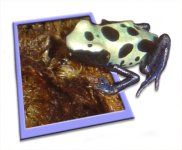
The tutorial seems to take things the long route...I used a few short cuts and threw this together quick...
 

Attachments

  • tinkerbell.jpg
    tinkerbell.jpg
    131.3 KB · Views: 92
Het, that's more detail than I went for :) You got the shadows put down better than I could also. And I like those frogs. colorful litle things.
I figured it out, but like you said, the instructions seem to be the long route, or lacking. I had to just play around till I figured it out, and it was basically, a LOT different than the instructions.
Here's what I came up with after some persistance.
http://www.faunaclassifieds.com/forums/showthread.php?t=73194


Ciao,
Rick
 
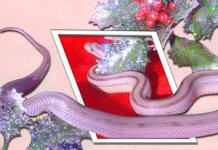
Here's the other one I did...

I was pretty bored last night and thought I'd test out the tutorials method. It drove me nuts so I did not my way.

I'm a graphic artist btw. ;)
 

Attachments

  • anerystripe_xmas_low.jpg
    anerystripe_xmas_low.jpg
    123.4 KB · Views: 98
Hey, that's pretty cool looking. never though about leaving bushes outside the frame.
A graphic artist huh? Wish I could say something like that. LOL
I'm a Civil / construction surveyor by trade. Only thing I'm good at, is trig / geometry and shooting firearms. :) and sometimes my pictures actually turn out well. LOL

Here's another I was working on, but wasn't happy with the shading. I wanted to try something else, but I need more pics.

Monitor5.jpg
 
This was a thread on PHOTOSHOP, not PHOTOGRAPHY. Also, if you are interested in advertising your site, Rich offers paid advertising options as well as a classifieds section.
 
Back
Top