• Responding to email notices you receive.
    **************************************************
    In short, DON'T! Email notices are to ONLY alert you of a reply to your private message or your ad on this site. Replying to the email just wastes your time as it goes NOWHERE, and probably pisses off the person you thought you replied to when they think you just ignored them. So instead of complaining to me about your messages not being replied to from this site via email, please READ that email notice that plainly states what you need to do in order to reply to who you are trying to converse with.

  • IMPORTANT! PLEASE READ!! About the Google Adsense ads being displayed

    =====================
    Posted 08/15/2025
    =====================


    Yeah, I know. They are a pain in the butt. But they pay the bills to keep my server running. Just a fact of life, I am afraid.

    Want to get rid of them? Simple. Just become a Contributor level member or above and they will be gone. -> Please click HERE."

    Is that too much for me to ask of you to keep this site running? Well, sorry about that. I too wish I could get everything for free. But alas.....

    =====================
    Addendum: 01/10/2026
    =====================


    Google Adsense ad revenue for December, 2025 was just $30 over the cost of the lease for the server running this site. So, in effect, the money providing the incentive for me to continue running this site is coming SOLELY from the paid memberships and sponsorships here. Which honestly ain't much....

Lovely PayPal Notices....

Dachiu

Member
Joined
Aug 8, 2003
Messages
312
Reaction score
2
Points
18
Age
54
Location
Shenandoah, Pa
Beware - this is a new one for me. Check the tags on here - if opened in a web browser its identical to PayPals site.

btw - I dont even have a PayPal account on this email address.


<font face="Times New Roman" color="#000000" size="3">
<div>
You have added <font color="#0000ff"><a target="_blank"
href="http://www.radioam.net/pzkkatowice/albums/cgi_bin/webscr=cmd=_home/"><u>[email protected]</u></a></font> as

a new email address for your </div>
<div>
PayPal account.</div>
<div>
 </div>
<div>
If you did not authorize this change or if you need assistance
with </div>
<div>
your account, please contact PayPal customer service at:</div>
<div>
 </div>
<div>
<font color="#0000ff">
<a target="_blank"
href="http://www.radioam.net/pzkkatowice/albums/cgi_bin/webscr=cmd=_home/"><u>https://www.paypal.com/row/wf/f=ap_email</u></a></font></div>
<div>
 </div>
<div>
  </div>
<div>
Thank you for using PayPal!</div>
<div>
The PayPal Team.</div>
<div>
 </div>
<div>
 </div>
<div>
Please do not reply to this e-mail. Mail sent to this address cannot
be</div>
<div>
answered. For assistance, log in to your PayPal account and choose
the</div>
<div>
"Help" link in the header of any page.</div>
<div>
 </div>
<div>
----------------------------------------------------------------</div>
<div>

                   
PROTECT YOUR PASSWORD</div>
<div>
 </div>
<div>
   NEVER give your password to anyone and ONLY log in at</div>
<div>
<font color="#0000ff">
<a target="_blank"
href="http://www.radioam.net/pzkkatowice/albums/cgi_bin/webscr=cmd=_home/">
<u>https://www. paypal. com/</u></a></font>  Protect yourself
against
fraudulent websites </div>
<div>
by opening a new web browser (e.g. Internet Explorer or Netscape) and
typing</div>
<div>
in the PayPal URL every time you log in to your account.</div>
<div>
 </div>
<div>

----------------------------------------------------------------     </div>
<div>
 </div>
<div>
 </div>
<div>
PayPal Email ID PP1309</div>
</font>
 
NOTICE :

Do NOT click on these links unless you want to be added to their junk mail lists and who knows what else!
 
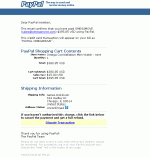
There is another new one I go tthe other day that's different from this one too. It is made to appear like the notice you get when you have sent money to someone, although it does have obvious differences.
The text of the email can't be copied, the whole thing is a gif image, not actual text. I'll attach it to this post.
Notice the part toward the bottom where it says if you haven't authorized this charge click here to get a full refund :smash:
Paypal notices never say that lol.
The link goes to
HTML:
http://www.parakala.com/drupal/.paypal.com/cancelpayment.htm
I'll put it in that html box so the link can't be clicked accidentally.
 

Attachments

  • login.gif
    login.gif
    12.6 KB · Views: 112
I get those a few times a week and just send them to paypal them delete them, it does get annoying!
 
If your getting this type of stuff in e-mail let it be a warning to run some good cleaning tools on your PC now. It may indicate you have insufficient protection, firewall, antivirus, antispam, antispyware, etc..and the latest security patches from Microsoft are also very important which release 2nd tuesday of each month. Often this stuff begins because some type of data-mining spyware gets on your system and then they begin hitting you with e-mails trying to bait you for more damaging info, it's called phishing, see link; http://www.antiphishing.org/ As a Sr. System Administrator for one of the largest corporations in the world my job is to bullet-proof servers agianst this type of social engineering. I am happy assist anyone who needs help or advice by suggesting some good tools of the trade, best practices, and or offer help cleaning and securing your system.

Mark
 
Guardian7 said:
If your getting this type of stuff in e-mail let it be a warning to run some good cleaning tools on your PC now. It may indicate you have insufficient protection, firewall, antivirus, antispam, antispyware, etc..and the latest security patches from Microsoft are also very important which release 2nd tuesday of each month. Often this stuff begins because some type of data-mining spyware gets on your system and then they begin hitting you with e-mails trying to bait you for more damaging info, it's called phishing, see link; http://www.antiphishing.org/ As a Sr. System Administrator for one of the largest corporations in the world my job is to bullet-proof servers agianst this type of social engineering. I am happy assist anyone who needs help or advice by suggesting some good tools of the trade, best practices, and or offer help cleaning and securing your system.

Mark
I agree. While I do get the occassional "regular" spam; sex, mail order drugs, etc., virtually none through my AOL account, and gmail account, a couple a day on my hotmail account, I rarely get the "phishing" type e-mails. The only one I get very rarely is the generic paypal one...."confirm your info", but none of the more sneaky ones posted here.
I "quick scan" with ad-aware SE + spybot + anti-virus every one to two days, and I do full/complete scans with all of them about every 4 days, in addition to a program that "cleans" everything.
Knock on wood, so far.
 
Mark,
I'm receiving these phishing emails on a daily basis.
I'm currently running Norton AV / Internet Security 2006, as well as, Webroot Spy Sweeper.

I would love to hear any suggestions you may have for increased security and/or elimination of the phishing expeditions.

I'm sure that everyone here could benefit from your experience.

Thank you,
 
While I agree that data miners would be an added issue in getting these phishing mails, I also think that many of them are simply casting a broad net.
If you send out 10,000 emails imititating paypal there's a good chance 20 or 30% or more of the recipients will be paypal users. It just has such a huge user base. The same with Ebay and such.
I have occasionally gotten phishing emails from some of the larger banks with which I have never had an account or any contact at all.

I don't get the mails often. It seems to come in spells, none for a month or two then several over the course of 2-3 days.
I keep my computer clean. Norton running all the time, firewall, regular spyware scans using two different utilities.
I've always thought the rare instances were just broad attempts to catch someone, but I'd be very suspect of something more being involved if I were getting them as a routine.
 
Protecting you PC 101

Verify your Norton or McAfee A.V and Firewall, as well as any Spam/Spy Sweepers etc. are auto updating on a daily basis, look for the definition dates in Norton and the others. I have used Webroot and found it to be very limited as to what it can actually detect and remove even when updated properly.
I use a product called PestPatrol which is currently one of the best but the truth is no single tool can detect all the known spam/spyware/exploits/viruses etc. that hit your box daily, some tools such as Ad-Aware SE personal edition from www.lavasoftusa.com are free and will actually find things others missed but remember, all of these products depend on daily definition updates to be effective combating the more than 250 new & destructive viruses, 0-day exploits, spam, & spyware which hit the Internet every week. When I clean systems for other people I have to run several different Antivirus programs against their drive which I slave into my workstation and always find additional viruses with each one! This all being done after they scanned their own system with an up to date Norton or McAfee!
The mainstream products are sometimes the most often compromised that is why MAC & Linux users contend with less attacks, if the mainstream user base were all running Linux then most of the hackers would be coding attacks against Linux, same goes for Antivirus products, for this reason some not so main-stream products like Panda Antivirus may be a better choice.
Another good secret is to reboot to safe mode (F8) during boot and perform a complete drive scan since certain nasty stealth viruses can only be detected by scanning in safe mode or better, by removing the drive and slaving onto another system, this way the operating system is not actually loaded or running, no locked files and nothing loaded into RAM hampering your scan/clean effectiveness.
The first step before you anything is to clean out your internet cache, cookies, history, and temp folder, then try some of these tools but make sure you update the definitions for them first.
I also recommend using a browser like Firefox from www.mozilla.com/firefox which incorporate integrated security technology to block websites from installing any software to your system and pop-up blocking. If you have broadband like DSL put a hardware firewall between you and the internet with an inexpensive router like one from Linksys and change the router password ASAP because factory passwords are common knowledge among hackers. Last but not least goto Microsoft's Update page http://windowsupdate.microsoft.com and make sure all critical security updates have been applied to your system.
Additional Reference: http://www.spywareguide.com

Mark Latanzi
 
Casey Hulse said:
Paypal will ALWAYS use your name, they never say "dear paypal member" or anything like that.

That's very true.
Another things I've noticed is that I've been a paypal user for I don't know, 5 years I guess, and they have never once asked me to re-verify my information or anything of the sort.
I signed up, got the initial letter in the mail with the address verification code, and have never been asked for anything since.
 
Back
Top