

• Responding to email notices you receive.
    **************************************************
    In short, DON'T! Email notices are to ONLY alert you of a reply to your private message or your ad on this site. Replying to the email just wastes your time as it goes NOWHERE, and probably pisses off the person you thought you replied to when they think you just ignored them. So instead of complaining to me about your messages not being replied to from this site via email, please READ that email notice that plainly states what you need to do in order to reply to who you are trying to converse with.

  • IMPORTANT! PLEASE READ!! About the Google Adsense ads being displayed

    =====================
    Posted 08/15/2025
    =====================


    Yeah, I know. They are a pain in the butt. But they pay the bills to keep my server running. Just a fact of life, I am afraid.

    Want to get rid of them? Simple. Just become a Contributor level member or above and they will be gone. -> Please click HERE."

    Is that too much for me to ask of you to keep this site running? Well, sorry about that. I too wish I could get everything for free. But alas.....

    =====================
    Addendum: 01/10/2026
    =====================


    Google Adsense ad revenue for December, 2025 was just $30 over the cost of the lease for the server running this site. So, in effect, the money providing the incentive for me to continue running this site is coming SOLELY from the paid memberships and sponsorships here. Which honestly ain't much....

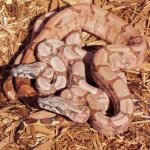
New babies !!!Salmontines!!!

JungleHabitats

New member
Joined
Aug 17, 2002
Messages
902
Reaction score
1
Points
0
Age
55
Location
Morganton NC
Just got this pic from Mike @ basically boas from a outside shot today ANTICIPATION builds waiting till wed
let me know what ya think

WELL i was going to POST a pic but it want load from my computer... hmmm anyone that can tell me how to make pictures appear here when loaded from my hard drive ???????
 
How to post a pic

Alan,

To post a picture that you have on your hard drive, all you have to do is cllick on the attach file button...The attach file section is located at the bottom of the screen, the one you see when starting a thread or making a post...All you have to do is click on the browse button in the attach file section...From there you locate the pic, select it, then press open...It will return you to you post...Then all you have to do is hit the submit button...


Hope I didn't confuse you with all the buttons...
 
n.p

n.p

ok it worked this time first time it didnt work for three tries lol none the less here they ARE!!
 

Attachments

  • alanhallsalmontines.jpg
    alanhallsalmontines.jpg
    104.5 KB · Views: 108
Back
Top