• Responding to email notices you receive.
    **************************************************
    In short, DON'T! Email notices are to ONLY alert you of a reply to your private message or your ad on this site. Replying to the email just wastes your time as it goes NOWHERE, and probably pisses off the person you thought you replied to when they think you just ignored them. So instead of complaining to me about your messages not being replied to from this site via email, please READ that email notice that plainly states what you need to do in order to reply to who you are trying to converse with.

  • IMPORTANT! PLEASE READ!! About the Google Adsense ads being displayed

    =====================
    Posted 08/15/2025
    =====================


    Yeah, I know. They are a pain in the butt. But they pay the bills to keep my server running. Just a fact of life, I am afraid.

    Want to get rid of them? Simple. Just become a Contributor level member or above and they will be gone. -> Please click HERE."

    Is that too much for me to ask of you to keep this site running? Well, sorry about that. I too wish I could get everything for free. But alas.....

    =====================
    Addendum: 01/10/2026
    =====================


    Google Adsense ad revenue for December, 2025 was just $30 over the cost of the lease for the server running this site. So, in effect, the money providing the incentive for me to continue running this site is coming SOLELY from the paid memberships and sponsorships here. Which honestly ain't much....

Which Web Browser do you use?

What browser do you use and why?


  • Total voters
    18
I think I have a hunch where this is going....and I'm very interested.

Depends on where I am.
At the house, I use primarily Google Chrome (there are things I have to access that only work with IE or Safari).
 
Chrome.

I liked Firefox, but Chrome is more streamlined along the top. Never tried Safari. Maybe one day??
 
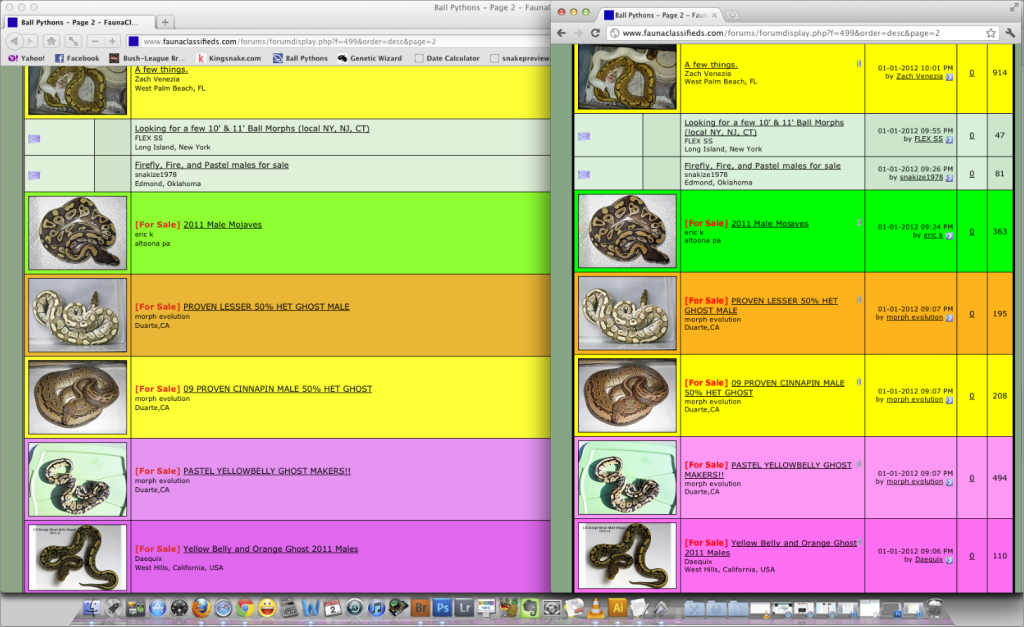
Ok what I'm getting art here is how color is perceived on the web.

Here in this image if you should be able to see a slight color shift in browsers in the 3 different browsers I've used here.
Test this out yourself in different browsers at the link and look at the side by side.
http://images.search.yahoo.com/images/view;_ylt=A0PDoX6ZUP5OK1EA77.JzbkF;_ylu=X3oDMTBlMTQ4cGxyBHNlYwNzcgRzbGsDaW1n?back=http%3A%2F%2Fimages.search.yahoo.com%2Fsearch%2Fimages%3Fp%3Dweb%2Bcolor%2Bchart%26_adv_prop%3Dimage%26va%3Dweb%2Bcolor%2Bchart%26fr%3Dmoz35%26tab%3Dorganic%26ri%3D53&w=796&h=985&imgurl=www.coastairbrush.com%2Fcolorcharts%2Fimages%2FCC01.jpg&rurl=http%3A%2F%2Fwww.coastairbrush.com%2Fcolorcharts%2Fautoair1.html&size=151.4+KB&name=...+web+color+limitations.+Color+Charts+featuring+actual+color+chips+are&p=web+color+chart&oid=be6d024f0307e2e90a35c44fc32f6c39&fr2=&fr=moz35&tt=...%2Bweb%2Bcolor%2Blimitations.%2BColor%2BCharts%2Bfeaturing%2Bactual%2Bcolor%2Bchips%2Bare&b=31&ni=180&no=53&tab=organic&ts=&sigr=11mgitdsf&sigb=13s4d52f8&sigi=11hjidfv5&.crumb=axwV/G/yu2s

This whole color thing has been driving me crazy lately because what images I see on my computer screen looks accurate and then looking at them online I can notice some color shift.

I'm using a high gamut NEC display that I religiously keep calibrated with my Color Calibration Colorimeter and software so I know my display is properly calibrated.

Can you see the difference in colors in the different browsers?
 

Attachments

  • 3-web-browers-color.jpg
    3-web-browers-color.jpg
    156.6 KB · Views: 169
I use Firefox because the free add-ons are great. NoScript is fantastic and preventing viruses from even touching your system. The web developer add-ons like FireBug, FireFTP, and ColorZilla are invaluable for the web design things I've been doing lately. Granted, FireFox is a little larger on the back-end than say, Chrome, so loading times are a bit more, but honestly I love Firefox's security features and versatility. It really is a "build your own browser."
 
For certain reasons Firefox is the best browser not only for it's add-ons but if you want to have a tight color management workflow for images for the web and you use calibration software & tools you can customize Firefox color space to match your display.

I also like using Safari and really like the way bookmarks are handled so that you can preview the webpages.

Google Chrome, it's fast but I don't like having everything I do on the web stored in a database forever.

Internet Explorer, well I haven't used it in many moons...

If you want to see how your Display reacts to Tagged/Untagged images check out these web sites to start.

http://gearoracle.com/tools/web-browser-color-management-test/


http://www.gballard.net/psd/srgbforwww.html


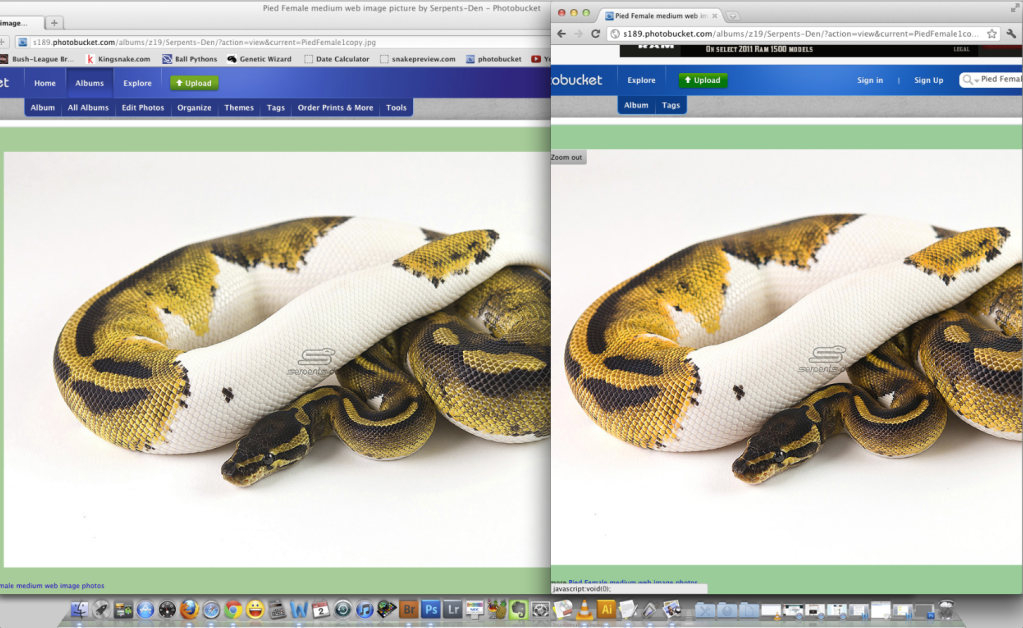
Here's a screenshot of how color can shift when you upload it to the web.
Original pic is on the left.

I have no more color shift in my images!!!

:?party:
 

Attachments

  • Monitor Calibrated for Photo Editing.jpg
    Monitor Calibrated for Photo Editing.jpg
    109.9 KB · Views: 184
Oh nice! Thank you for the tip!

I done mine manually first and then found this and downloaded it and got the same results, quite a difference. As you can see after upgrading the Firefox things will look the way they should rather than over saturated.


Screenshot with Firefox upgraded on the left vs Chrome.

FirefoxvsChrome_ScreenShot.png


ScreenShot2012-01-02at64343AM.png
 
Well I just looked at the above post in Chrome and you can see a difference but both the comparisons are over saturated so people will need Firefox with the upgrade and a calibrated display to see the best results.
 
Back
Top